The Residents App allows users to easily report errors, request new features, and chat with Mia, the AI-powered assistant. This ensures that your concerns, suggestions, and questions are efficiently addressed.
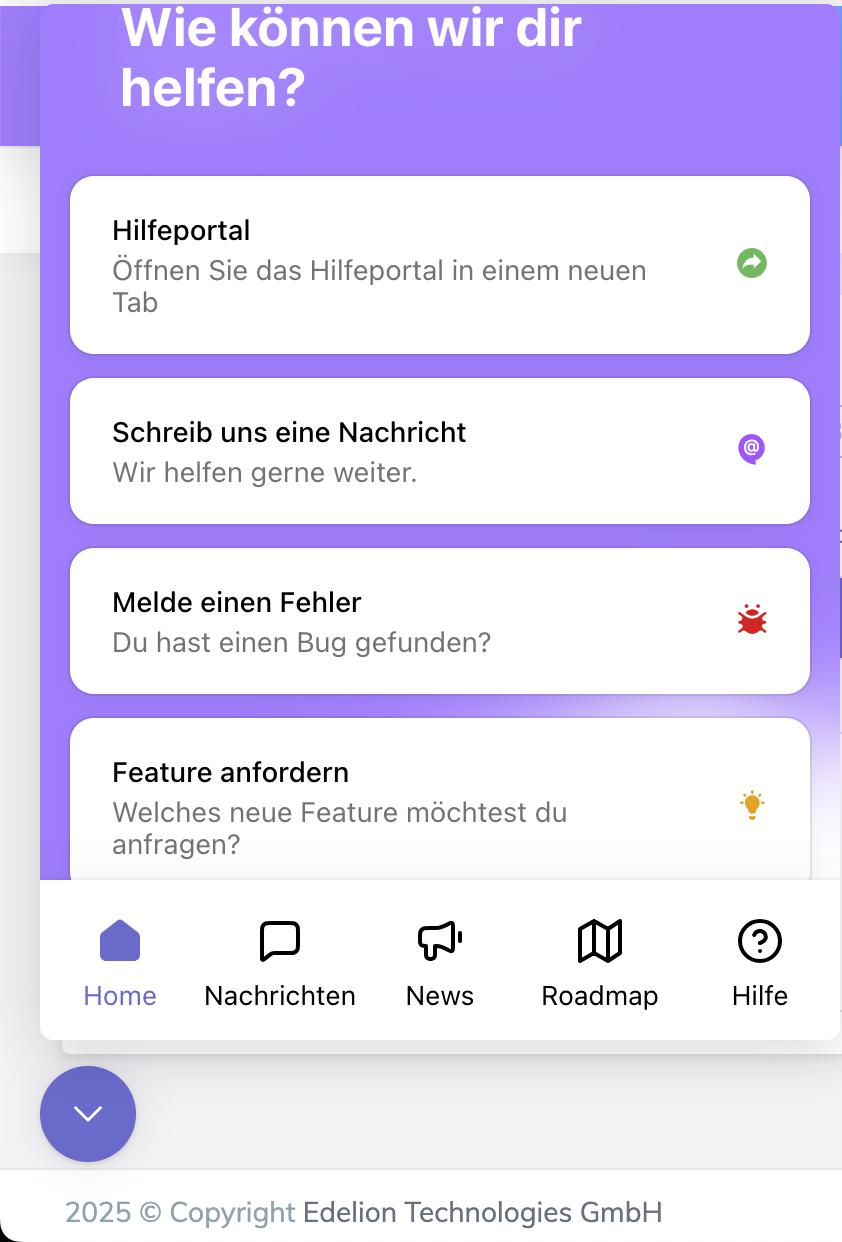
If you encounter a technical problem, you can report it directly through the app.
Tap the Home Icon 🏠 in the bottom navigation bar.
Select Report an Issue 🐞.
Provide details about the problem:
Describe the issue (e.g., what is not working).
Attach a screenshot or screen recording (recommended).
Screenshots help capture visual errors.
Screen recordings provide a step-by-step view of the issue, making it easier for the technical team to identify the problem.
Tap "Submit" to send your report to the Edelion technical team.
You will receive confirmation that your report has been submitted.
The Edelion team will review your issue and work on a resolution.
You can track the status of your report in the Messages (💬) section.
Do you have an idea for improving the App? You can submit a feature request directly within the app.
Tap the Home Icon 🏠 in the bottom navigation bar.
Select Request a Feature 💡.
Describe your request, including:
What the new feature should do.
How it would improve the user experience.
Any specific problems it would solve.
Tap "Submit" to send your request to the Edelion team.
Your request will be reviewed and considered for future updates.
You can track the progress of your request in the Roadmap (🗺) section.
Mia (My Intelligent Assistant) is an AI-powered chatbot available 24/7 to assist you.
Tap the Home Icon 🏠 in the bottom navigation bar.
Select Send Us a Message 📩.
Type your question, and Mia will provide an instant response.
Answering questions about app features.
Providing step-by-step guidance on tasks.
Helping troubleshoot common issues.
✅ What happens if Mia doesn’t have an answer?
If Mia cannot provide a suitable response, your request will be automatically forwarded to the Edelion customer service team, and a support agent will assist you as soon as possible.
All error reports, feature requests, and chats with Mia are stored in the Messages (💬) section.
Tap the Messages Icon 💬 in the bottom navigation bar.
Here, you can see all past interactions with the support team.
If you need further assistance, you can:
Check the Help Portal 📖 for FAQs and guides.
Contact the Edelion support team directly through the widget.
We’re always here to help! 🚀

