Use the services overview when you want to:
View all recorded services in one place
Manage the status of services
Filter, group, or analyze service data
The services overview displays all recorded services in a central table.
At the top of the page, you will find status categories such as:
🟦 New
🟪 Sent to Billing
🟨 Invoiced
🟩 Paid
🟥 Cancelled
These provide a quick way to navigate and understand the current state of services.
Services move through different statuses during the billing process:
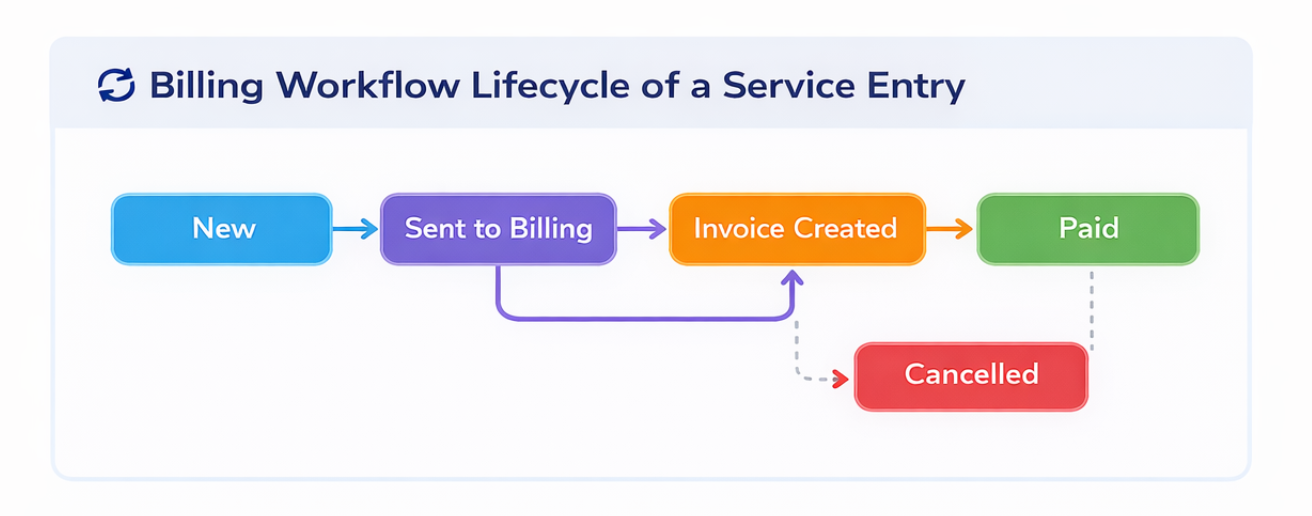
🟦 New: Service has been recorded but not yet processed for billing
🟪 Sent to Billing: Service has been forwarded to the billing process
🟨 Invoiced: Service has been included in an invoice
🟩 Paid: Invoice has been settled
🟥 Cancelled: Service has been cancelled and will not be billed
Use filters to narrow down the displayed services:
Period: e.g. current month
Date: select a specific date
Service Cost Type: filter by type of service
Resident: view services for a specific resident
Multiple filters can be combined.
You can group services based on different criteria.
How it works:
Drag a column (e.g. Resident or Period) into the “Group by” area
The table will be grouped accordingly
This is useful for analysis and reporting.
Services move through different statuses in the billing process.
To change status:
Select one or more services
Click Change status
Choose the desired status
👉 Examples:
New → Sent to Billing
Sent to Billing → Paid
Individual services can be edited directly.
How it works:
Click the edit icon in the respective row
Make the required changes
You can add new services directly from the services overview.
👉 For detailed steps, see:
Overview based workflow: Add Service from Services Overview
Add a service from the services overview to the billing list.
The services overview is ideal for daily management and monitoring
Status changes impact the billing workflow
Use filters and grouping to manage large datasets effectively
Recording Billable Services for Residents – Overview
Record billable services and products for residents using different workflows in Edelion.
Configure Permissions for Service Entry
Configure the required permissions so that users can record services for residents.
We're here to help. Please feel free to contact us.

