Use this configuration to ensure that users can access and use the different service entry workflows.
To enable service entry, the following permissions must be assigned:
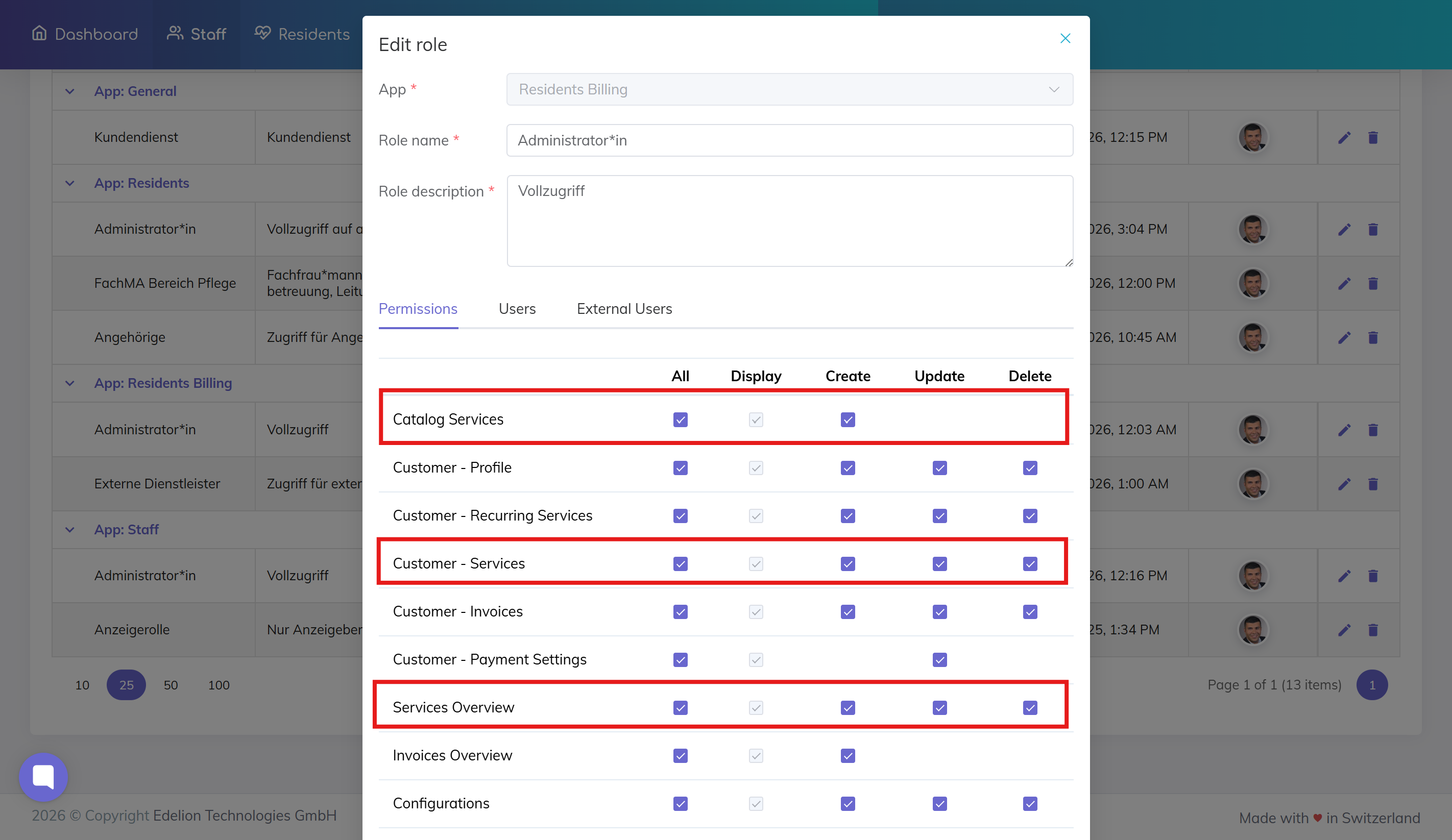
Allows access to the service catalog.
👉 Required for:
Adding services from the catalog (basket)
Catalog based workflow: Add Service from Catalog
Add a product or service from the catalog to a resident’s billing items list.
Allows creating and managing services for residents.
👉 Required for:
Adding services from the resident profile
Recording services for billing
Resident based workflow: Add Service from Resident Profile
Add a service directly from the resident profile to the resident’s billing items list.
Allows access to the central services overview.
👉 Required for:
Adding services from the services overview
Overview based workflow: Add Service from Services Overview
Add a service from the services overview to the billing list.
Depending on the workflow, some permissions may be optional:
Catalog only → only Catalog Services required
Resident profile only → only Customer – Services required
Overview only → only Services Overview required
Recording Billable Services for Residents – Overview
Record billable services and products for residents using different workflows in Edelion.
We're here to help. Please feel free to contact us.